As Google recently decided to no longer support the Unity plugin on a standard basis, I have decided to give Unity WebGL a chance.
Unity Technologies have termed it a preview, as it demands a lot of memory. In addition the development is in its infancy and at the moment all producers of browsers are trying to improve WebGL and arrange it for performance.
In any case, in principle it is quite impressive, what the developer of Unity has put together. In the course of this innovation I have also decided not to provide Google Native Client any longer.
- WebGL will be supported standardly for Firefox users. That is the target platform that is recommended by Unity.
- When I try to use the Internet Explorer 11, the browser just crashes.
-
Chrome and Chromium also make WebGL available. In the current version it should be active automatically.
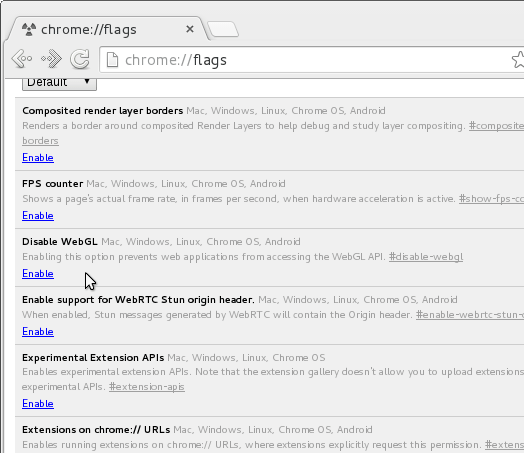
For older versions it still has to be activated manually. Type chrome://flags/ into the address bar
and check that Disable WebGL is not active. If it has a grey background as in the image, WebGL will
be displayed. If you have a white background, then you can activate WebGL by clicking »Disable«.
Maybe you will have to then restart the browser.
I am only supplying the gzip compressed version on the assumption, that current browsers, which support WebGL, will also support gzip.
Share on Facebook Share on Twitter Share on LinkedIn
Game Dev.
,
Tutorials
,
Unity3D